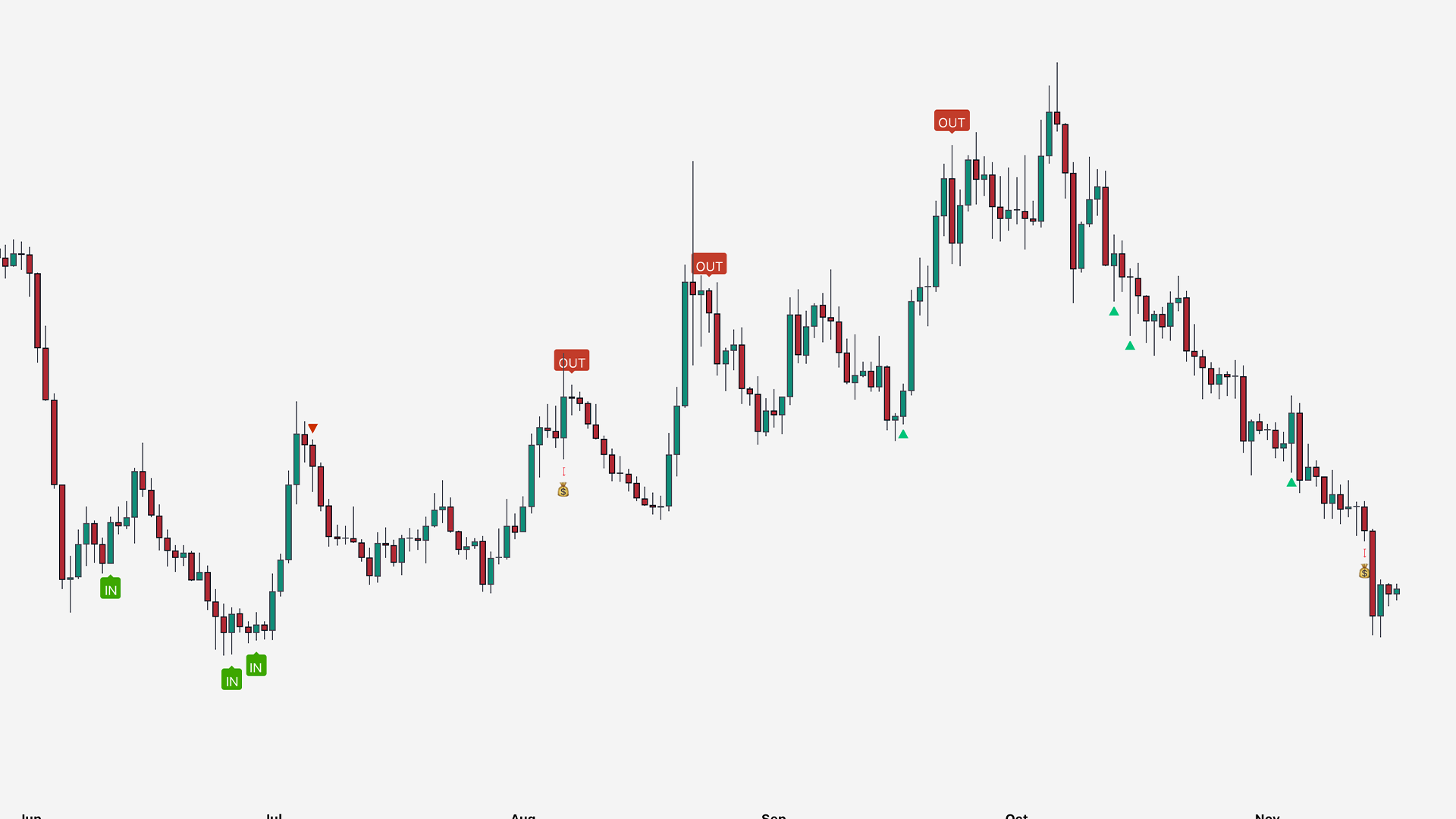
Crypto4light TradeON is a trading indicator designed to help traders identify potential entry and exit opportunities, manage open positions, and adapt their trading approach to different market conditions.
The indicator combines RSI and Williams %R calculations to identify potential market turning points and generate signals for entering, managing, and closing positions.
It provides four main types of signals: IN, OUT, Take Profit, and directional triangles.
IN / OUT Signals
IN – Potential Entry Signal
The green IN signal identifies a potential opportunity to open a long position.
There are several ways to approach an entry:
- Enter after the IN signal appears and the candle closes. Stop Loss can be placed below the signal candle’s body or wick, depending on your risk management.
- Alternatively, wait until approximately 40–50% of the signal candle’s body has formed before entering. Stop Loss can be placed according to the signal candle’s body or wick.
OUT – Potential Exit Signal
The red OUT signal identifies a potential opportunity to close a long position or reduce exposure.
It can also be used as an indication to reassess your position and wait for the next trading opportunity.
Directional Triangles – Position Management
Green and red triangles provide additional information after an IN or OUT signal. They can be used in different ways depending on your trading style and risk management.
There are three possible approaches:
1. Following the Main Signals
After entering a position on an IN signal, you can hold it until the Take Profit signal or the next OUT signal appears.
If an opposite signal appears, you can close the existing position and consider an opportunity in the opposite direction.
2. Partial Profit-Taking
After opening a position, each new directional triangle can be used as an opportunity to close a percentage of the position in profit.
With each subsequent triangle, you can gradually reduce exposure and move your Stop Loss toward breakeven, depending on your trading plan.
3. Closing the Entire Position
Another approach is to close the entire position when a directional triangle appears and wait for the next main IN or OUT signal before considering a new entry.
This approach allows traders to use the triangles as early position-management signals while relying on the main signals for potential new entries.
Take Profit Signal
The Take Profit signal appears when the indicator identifies a potential opportunity to close approximately 80–100% of an open position.
After this signal, traders can wait for a new IN/OUT signal or a directional triangle before considering their next move.
Consecutive IN / OUT Signals
Sometimes, two identical IN or OUT signals may appear consecutively.
In this situation, traders can consider building or closing a position in separate portions rather than executing the entire trade at once.
This approach can help establish an average entry or exit price.
If using the second signal as an additional entry, the Stop Loss can be placed relative to the body or wick of the latest signal candle, according to your risk management.
Alerts & Notifications
Crypto4light TradeON includes five alert conditions:
- IN – Notification when a potential long entry signal appears.
- OUT – Notification when a potential exit signal appears.
- Take Profit – Notification when a Take Profit signal appears.
- Triangle Up – Notification when a bullish directional triangle appears.
- Triangle Down – Notification when a bearish directional triangle appears.
You can configure alerts individually according to your preferred timeframe and trading strategy.
Important: Crypto4light TradeON is an analytical tool designed to support trading decisions. Signals are not guarantees of future price movements or profitable trades. Entry timing, Stop Loss placement, position sizing, and profit-taking should always be determined according to your own strategy and risk management.